Calendar sync
Your bookings in every calendar, outside bookings in yours
Ruumio sends your studio's bookings to Google, Apple or Outlook Calendar and reads the busy times of outside calendars back in, so a room booked elsewhere can't be booked twice. Members, admins and staff each get their own calendar link, and a room or a staff member can have an outside calendar that Ruumio checks every 15 minutes.
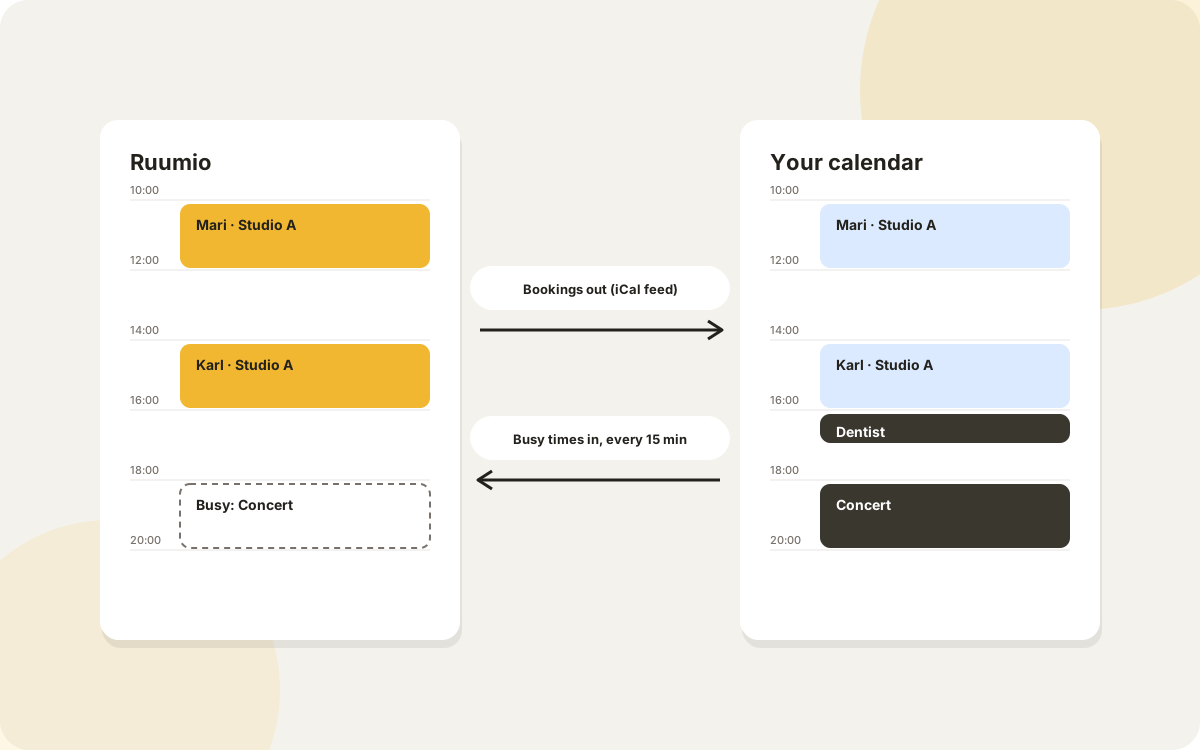
Bookings out: a calendar link for everyone
Every member has a secret calendar link to their own bookings at your studio. They add it to Google Calendar with one click, or to Apple or Outlook Calendar with the link, and new and cancelled bookings show up there by themselves. Calendar apps refresh such links on their own schedule, usually about once an hour.
Admins have two more: the studio calendar with every booking and the booker's name, and a calendar per room with just that room's bookings, for example for the room's own Google calendar. Each event links back to Ruumio and carries the address of the room.
- Member feed: their own bookings
- Studio feed: every booking, for admins
- Room feed: one room's bookings, for admins
- Staff feed: their jobs and their own bookings
Staff see their jobs in their own calendar
A staff member's calendar link also carries the bookings they are assigned to, as jobs: who booked and how to reach them, the extras, the answers to your booking questions and the booking's note. When a job changes or is cancelled, their calendar follows by itself.
Links that stay private
Every link is a long secret address. Anyone with it can see those bookings, so if one is shared by mistake, make a new one: the old link stops working at once. Each link belongs to one studio, and a member's link stops working when they are no longer an active member.
Confirmation e-mails carry a calendar file too, and a recurring series comes with one file for all its dates, so members who don't subscribe still get their bookings into their calendar.
Bookings in: outside calendars block a room
Is the room also booked somewhere else, say in a shared Google calendar or on another platform that publishes one? On a paid plan, add that calendar's iCal address to the room (in Google it is the secret address in iCal format). Ruumio reads it every 15 minutes, and the times busy there can't be booked by members or guests.
In your admin calendar those times show as blocked from an outside calendar. Admins can still book over them when they know the time is free after all, just as they can book over closures. If a calendar can't be read, Ruumio keeps the busy times from the last read, shows the reason in the room's settings and tries again 15 minutes later.
Google Calendar, connected directly
On every paid plan a room or a staff member can connect a Google calendar with Google's own sign-in instead of an iCal address. The room's bookings, or the staff member's jobs, are written into the calendar you pick within about a minute of any change, and its busy times are read back every 15 minutes.
A room's events show the room's name, and the booker's name only if an admin turns that on. A staff member's jobs show who booked. E-mail addresses, phone numbers, answers and notes never go to Google. Disconnecting removes the upcoming bookings from the calendar and ends Ruumio's access.
When an outside event clashes with a booking
If an event appears in a room's outside calendar over a booking that already exists, or a staff member is busy in their own calendar during a job, the admin calendar points it out. In the conflicts view you choose which one wins: keep the booking, or cancel it (with the refund choice) or take the staff member off it.
Recurring, moved and cancelled events
Outside calendars are rarely simple. Ruumio expands recurring events, follows occurrences that were moved, skips occurrences that were cancelled and events marked as free, treats all-day events as the whole day and reads each time in its own time zone.
Events that came from Ruumio's own feeds are skipped. A room's Google calendar can therefore subscribe to the room feed and be read back in without blocking its own bookings.
Staff members' own calendars
A staff member can add their personal calendar's iCal address. While they are busy there, they aren't assigned to bookings: an extra that assigns staff picks the next free person, and an admin assigning by hand is told they are busy.
Only the times, nothing more
From an outside calendar Ruumio keeps only when each busy time starts and ends: no titles, descriptions or guests. Calendar addresses must be https or webcal addresses on the public internet; addresses pointing into a private network are refused.
Questions
Does it work with Google Calendar, Outlook and iCloud?
Yes. iCal works both ways with all three: you subscribe to Ruumio's links in them, and on a paid plan you give Ruumio their secret iCal address. On every paid plan a Google calendar can also be connected directly with Google's sign-in.
How quickly does an outside booking block the room?
Ruumio reads outside calendars every 15 minutes, so within a quarter of an hour of the event appearing in that calendar's iCal feed.
Can I still book a time that an outside calendar blocks?
Yes, as an admin. Members and guests can't; you can book over the busy time when you know it is free.
Will members see who else booked?
No. A member's link has only their own bookings. The studio feed, with bookers' names, is meant for admins; a room's feed shows only that the room is taken.
Updated 23 November 2026
Read next
Ruumio is coming to the United States
We're opening state by state. Join the waitlist and we'll invite you as soon as your state opens.
Join the waitlist